Normal Mapping in Unity URP: Lighting in Tangent Space
How normal mapping fakes surface detail without extra geometry, and a complete URP shader that builds the tangent-space basis in the vertex shader.
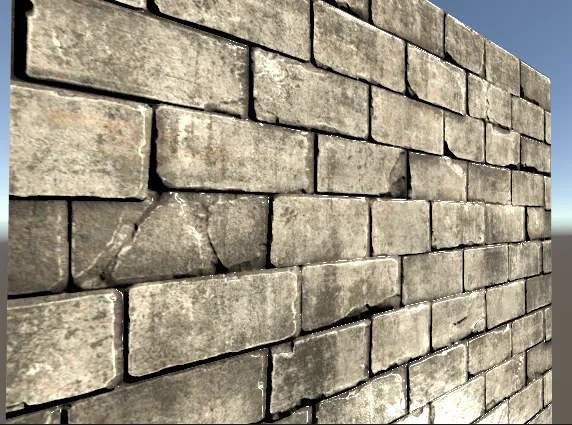
Raising the quality of a 3D asset eventually leads to wanting to represent the bumps and dents of the object as well.
Representing that with geometry costs you. Fine detail like the wrinkles in skin, or the pattern pressed into a small prop, means raising the polygon count, and the rendering cost rises with it.
It also buys less than it appears to. An object built from millions of polygons covers the same area of the screen as any other, and once it is drawn, most of those hard-won polygons come out smaller than a single pixel.
So the idea appears that fine detail only has to look right — and from that fake comes normal mapping, or bump mapping, built on a normal map.
The geometry is never modified, so the surface really is still flat. It simply catches light as though it were uneven, and the light and shade that produces is what makes it read as uneven.
What a normal map stores
A normal map encodes a normal direction in each texel, packed into the RGB channels. Where a regular texture answers “what color is this point”, a normal map answers “which way is this point facing”.
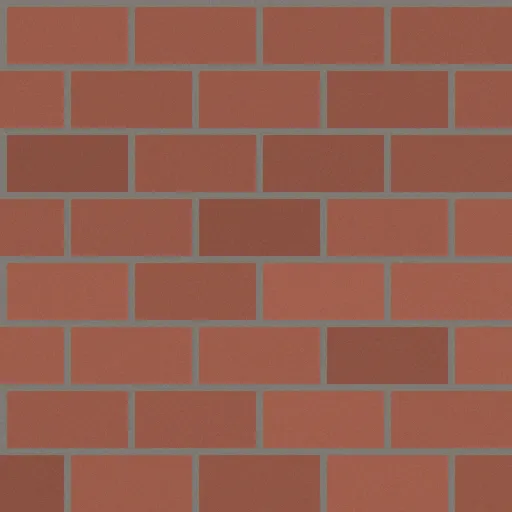
Base map
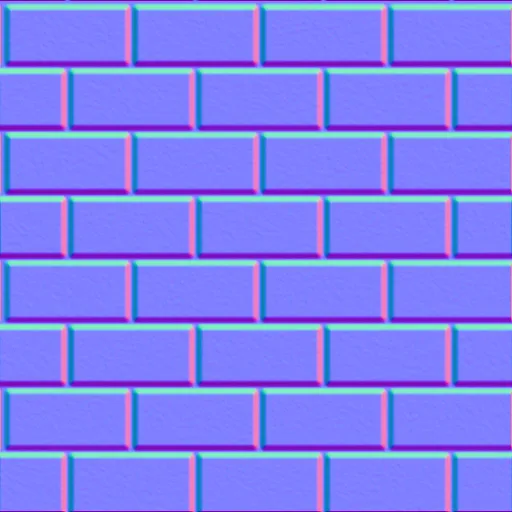
Normal map
These maps are usually generated from a height map, which is a much more intuitive thing to author: white is high, black is low. To convert one into the other, you take the difference in height between neighboring texels in the horizontal and vertical directions, and compute the vector orthogonal to both slopes. That vector is the normal, and writing it out per texel gives you the normal map.
Lighting then uses three vectors: the normal we just sampled, the direction to the viewer, and the direction to the light.
The difference it makes
Here is the same wall rendered with only the base color texture, and then with a normal map driving the lighting.
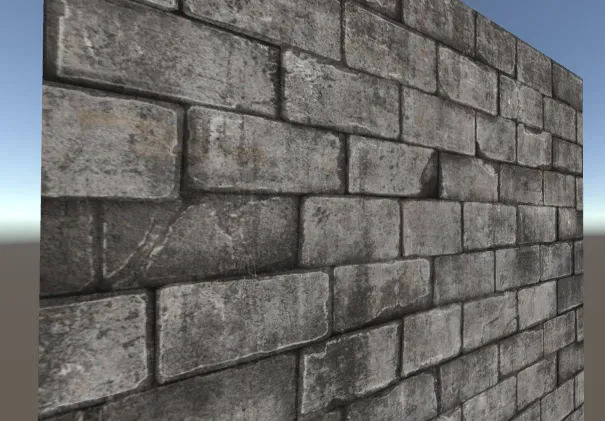
The surface reads as uneven, but the more striking part is how much more present the wall looks once lighting actually varies across it. A flat texture receives flat light; a normal-mapped one does not.
Implementation
The full shader lives in my shader repository, alongside the more advanced techniques that build on it:
- Repository: HelloCG-creative/Shader
- This shader:
NormalMapping.shader
Full shader
Shader "Custom/NormalMapping"{    Properties    {        _MainTex ("Texture", 2D) = "white" {}        [Normal] _NormalMap("NormalMap", 2D) = "bump"
        _Shininess("Shininess", Float) = 0.07    }    SubShader    {        Tags { "Queue"="Geometry" "RenderType"="Opaque" "RenderPipeline"="UniversalPipeline"}        LOD 100
        Pass        {            Name "Normal"            Tags { "LightMode"="UniversalForward"}
            HLSLPROGRAM            #pragma vertex vert            #pragma fragment frag
            #include "Packages/com.unity.render-pipelines.universal/ShaderLibrary/Core.hlsl"            #include "Packages/com.unity.render-pipelines.universal/ShaderLibrary/Lighting.hlsl"
            struct appdata            {                float4 vertex : POSITION;                float2 uv : TEXCOORD0;                float3 normal : NORMAL;                float4 tangent : TANGENT;            };
            struct v2f            {                float2 uv : TEXCOORD0;                float4 vertex : SV_POSITION;                float3 viewDirTS : TEXCOORD1;                float3 lightDir : TEXCOORD2;                float3 lightColor : COLOR;            };
            TEXTURE2D(_MainTex);            SAMPLER(sampler_MainTex);
            TEXTURE2D(_NormalMap);            SAMPLER(sampler_NormalMap);
            float _Shininess;
            CBUFFER_START(UnityPerMaterial)            float4 _MainTex_ST;            float4 _NormalMap_ST;            CBUFFER_END
            v2f vert (appdata v)            {                v2f o;                o.vertex = TransformObjectToHClip(v.vertex.xyz);                o.uv = TRANSFORM_TEX(v.uv, _MainTex);
                float3 binormal = cross(normalize(v.normal), normalize(v.tangent.xyz)) * v.tangent.w;                float3x3 rotation = float3x3(v.tangent.xyz, binormal, v.normal);
                Light light = GetMainLight();
                // Transform the light and view vectors into tangent space here,                // so the pixel shader can work in the same space as the normal map.                o.lightDir = mul(rotation, light.direction);                o.viewDirTS = mul(rotation, GetObjectSpaceNormalizeViewDir(v.vertex));                o.lightColor = light.color;                return o;            }
            float4 frag (v2f i) : SV_Target            {                i.lightDir = normalize(i.lightDir);                i.viewDirTS = normalize(i.viewDirTS);                float3 halfVec = normalize(i.lightDir + i.viewDirTS);
                float4 tex = SAMPLE_TEXTURE2D(_MainTex, sampler_MainTex, i.uv);                float3 normal = UnpackNormal(SAMPLE_TEXTURE2D(_NormalMap, sampler_NormalMap, i.uv));
                normal = normalize(normal);
                float4 color;                float3 diffuse = max(0, dot(normal, i.lightDir)) * i.lightColor;                float3 specular = pow(max(0, dot(normal, halfVec)), _Shininess * 128) * i.lightColor;
                color.rgb = tex * diffuse + specular;
                return color;            }            ENDHLSL        }    }}
Walkthrough
Vertex shader: building the tangent-space basis
A normal map stores its normals in tangent space — a per-vertex coordinate frame aligned to the surface and its UV layout. The lighting math only works if every vector involved is expressed in the same space, so something has to be converted.
Converting the sampled normal into world or object space in the pixel shader would run that transform for every pixel on screen, which is expensive. So the light and view vectors are converted into tangent space in the vertex shader instead — once per vertex — and the results are handed to the pixel shader:
float3 binormal = cross(normalize(v.normal), normalize(v.tangent.xyz)) * v.tangent.w;float3x3 rotation = float3x3(v.tangent.xyz, binormal, v.normal);
Light light = GetMainLight();
o.lightDir   = mul(rotation, light.direction);o.viewDirTS  = mul(rotation, GetObjectSpaceNormalizeViewDir(v.vertex));o.lightColor = light.color;
The tangent and normal come straight from the mesh. The binormal (bitangent) is their cross
product, with tangent.w carrying the handedness sign — that sign is what keeps mirrored UV
islands from lighting inside out.
Pixel shader: unpacking the normal
float3 normal = UnpackNormal(SAMPLE_TEXTURE2D(_NormalMap, sampler_NormalMap, i.uv));
normal = normalize(normal);
UnpackNormal handles the decoding, which is not as simple as a range remap: depending on the
platform and compression format, Unity may store the normal as DXT5nm with the X channel moved
into alpha, or as a plain RGB texture. UnpackNormal picks the right path for the current target.
The explicit normalize afterwards is deliberate. Some formats come back effectively normalized
already and some do not, and interpolation across a triangle denormalizes vectors regardless.
Normalizing unconditionally keeps the result consistent across platforms rather than subtly
different on each.
Lighting
float3 diffuse = max(0, dot(normal, i.lightDir)) * i.lightColor;float3 specular = pow(max(0, dot(normal, halfVec)), _Shininess * 128) * i.lightColor;Standard Lambert diffuse plus a Blinn–Phong specular term, both driven by the sampled normal rather than the geometric one. That substitution is the entire technique.
Where this breaks down
Normal mapping only changes shading. It does not change where the surface is, which means it cannot represent one bump occluding another. At grazing angles, or when the camera gets close, the illusion falls apart — the surface reads as a flat plane with a pattern painted on it, because that is exactly what it is.
Fixing that requires shifting the sampling position based on view direction, which is where parallax mapping comes in — the subject of the next article in this series.